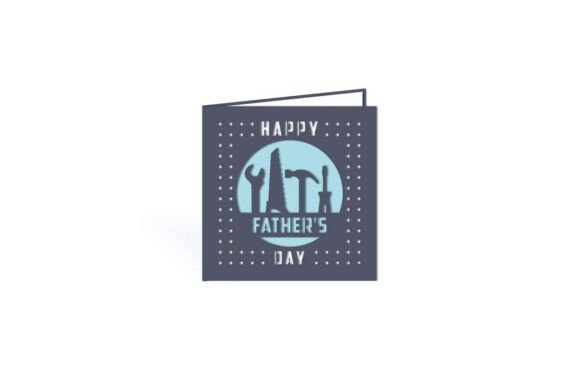
DIY Tools Father's Day Cut Out Card: A Creative and Personal Gift Option
Creating a handmade Father's Day card can be a meaningful way to show appreciation, and the DIY Tools Father's Day Cut Out Card offers a unique and customizable option for crafters of all skill levels. Whether you're a beginner exploring digital cutting machines or a seasoned creator looking for a fresh design, this cut-out card provides an engaging way to celebrate Dad with a personal touch. The design includes optional mat liner templates and is available in SVG, STUDIO, and PDF formats, making it compatible with popular software like Silhouette STUDIO, Cricut Design Space, SCAL, MTC, and more.
Why This Design Stands Out
The DIY Tools Father's Day Cut Out Card appeals to a wide audience because it blends practicality with creativity. It allows users to personalize messages and visuals using digital cutting machines, which are increasingly popular among hobbyists and small business owners alike. The tool-themed design is especially appreciated by dads who enjoy hands-on work, making it both relevant and thoughtful.
Additionally, the inclusion of an optional mat liner adds a professional finish, helping elevate a simple card into a memorable keepsake. For those who sell handmade goods or create content for crafting blogs, this design can also serve as a versatile project idea that resonates with Father's Day audiences.
Common Mistakes to Avoid
Despite its appeal, users sometimes encounter issues when working with digital cut files. Here are some common mistakes and how to avoid them:
- Choosing the wrong file format: Not all cutting machines support every file type. For example, Cricut users should prioritize SVG or DXF files, while Silhouette users can work with STUDIO files directly. Always verify compatibility before downloading.
- Overlooking file resolution: Low-resolution PDFs can lead to jagged cuts or poor print quality. Make sure the design you're using maintains clarity when scaled up or down.
- Ignoring layer organization: Some files come with multiple layers for different parts of the design. If layers aren't properly grouped or labeled, assembling the final card can become confusing.
- Printing on unsuitable paper: Using thin or low-quality paper can cause the intricate cutouts to tear or fold easily. Opt for cardstock or heavier weight paper (around 80–110 lb) for better durability and a polished look.
- Not testing with a sample cut: Jumping straight into cutting your final material without a test run can lead to costly mistakes. Use scrap paper or vinyl to confirm alignment and cut depth first.
How Mistakes Affect the Final Result
Even small oversights can have noticeable consequences. For example, using the wrong file format might result in distorted shapes or missing design elements. Misaligned layers can lead to mismatched cutouts, making the final card look unprofessional. Poor paper choices may cause the card to warp or tear, especially around detailed cut lines. These issues not only reduce the visual appeal but can also diminish the emotional impact of a handmade gift.
From a business or content creation perspective, these mistakes can harm your credibility. If you're selling or showcasing your work, clean, precise cuts and high-quality materials are essential for maintaining a professional image.
Practical Tips for Better Results
To get the most out of your DIY Tools Father's Day Cut Out Card, follow these best practices:
- Verify software compatibility: Before purchasing or downloading, check that the file types included (SVG, STUDIO, PDF) are supported by your cutting software and machine. Most platforms list compatible file types in their documentation.
- Preview the design: Use the preview function in your cutting software to see how the layers will look once assembled. This helps identify any alignment issues early on.
- Adjust cut settings: Each material reacts differently to blade pressure and speed. Adjust your machine's settings according to the thickness of your paper or cardstock for cleaner cuts.
- Use a mat liner for depth: The optional mat liner isn't just decorative—it helps frame the cut-out design and adds dimension. Consider using contrasting colors to make the design pop.
- Plan for assembly: Some cut-out cards require folding, gluing, or inserting tabs. Make sure you understand the assembly steps before cutting your final materials.
What to Check Before Downloading or Using the Design
Before committing to a design, take a few moments to review the following:
- License terms: If you plan to sell cards made from the design, ensure the license allows for commercial use. Some digital files are limited to personal use only.
- File organization: Well-structured files with labeled layers and grouped elements make the cutting and assembly process much smoother.
- Customer support: Reputable sellers often offer support or tutorials to help users troubleshoot issues. This can be especially helpful if you're new to digital cutting.
- Reviews and previews: Look for user feedback or preview images that show the final product. This gives you a better idea of what to expect and whether the design suits your needs.
Making the Most of Your Father's Day Project
The DIY Tools Father's Day Cut Out Card is more than just a template—it's an opportunity to create something meaningful. By paying attention to file quality, machine settings, and material choices, you can ensure your final card looks sharp and communicates your appreciation effectively.
For creators and small business owners, this type of project can also serve as a valuable content idea or product offering. Sharing your process through blog posts, social media, or YouTube tutorials can help others learn while showcasing your creativity and expertise.
Remember, the goal isn't just to make a card—it's to create a memorable experience for both the maker and the recipient. With a bit of planning and attention to detail, your DIY Father's Day card can become a cherished keepsake that Dad will proudly display for years to come.