ONE Birthday Card – SVG Cutting File
Design That Delights: A Creative Celebration Essential
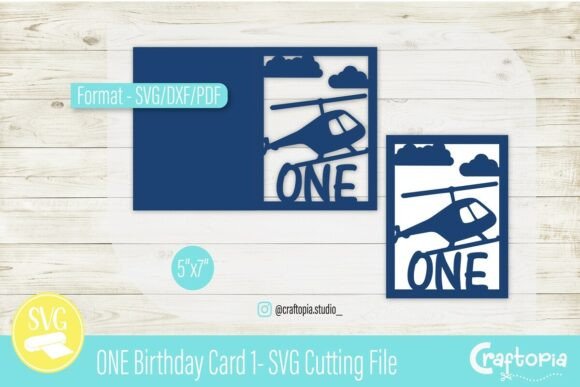
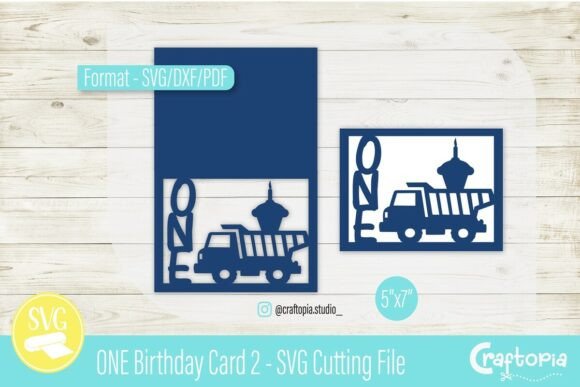
Bringing a child’s first birthday to life through handmade design is a meaningful way to preserve memories. The ONE Birthday Card – SVG Cutting File offers a fresh, playful approach to crafting cards, invitations, and keepsakes for this special milestone. Combining a construction theme with a sweet twist, the design features a dump truck carrying a cupcake topped with a candle, paired with bold vertical “ONE” lettering. This 5x7 card template is more than just a design—it’s a flexible creative tool for makers of all skill levels.
Why This SVG Cutting File Stands Out
Designed for use with cutting machines like Cricut and Silhouette, the ONE Birthday Card – SVG Cutting File is a digital download that includes SVG, DXF, and PDF formats. These file types ensure compatibility with popular design software, making it easy to customize and cut with precision. The clean cut lines and thoughtful layout allow for smooth assembly, whether you’re creating a single card or a batch of party invitations.
What makes this file especially appealing is its balance of whimsy and practicality. The construction theme resonates with many parents who love incorporating a “little builder” or “construction crew” motif into their child’s first birthday celebration. The dump truck and cupcake combination adds a unique storytelling element, blending the excitement of play with the sweetness of a milestone moment.
Creative Applications Beyond the Card
While the template is designed as a 5x7 card, its potential extends far beyond a single format. Here are a few creative adaptations you can explore:
- Party Invitations: Use the design as a base for digital or printed invites. Add coordinating colors and fonts to match your party theme.
- Scrapbook Pages: Incorporate the cut file into a memory layout. Layer with photos, journaling, and decorative paper to highlight your child’s first year.
- Gift Tags: Resize the design elements to create matching gift tags or favor labels for party guests.
- Banner Decor: Turn the dump truck and cupcake into a themed banner for your celebration. Print on cardstock or fabric for a reusable decoration.
- Card Series: Create a set of cards for future birthdays by reusing the style and layout with updated numbers and themes.
Each of these uses allows you to tailor the design to your specific needs while maintaining a cohesive visual identity. Whether you’re making one card or planning an entire themed celebration, the flexibility of this SVG file makes it a valuable asset in your creative toolkit.
Customization Tips for Personalized Results
One of the joys of using SVG cutting files is the ability to personalize designs. Here are a few ways to make the ONE Birthday Card – SVG Cutting File your own:
- Color Choices: Select a color palette that matches your party or photo theme. Bright primary colors give a bold, energetic look, while pastels offer a softer, more delicate feel.
- Layering: Use multiple layers of cardstock to add dimension to the dump truck and cupcake. Consider adding a glitter or foil accent to the candle for extra sparkle.
- Fonts: Experiment with different fonts for the word “ONE” to match your style. A bold sans-serif gives a modern edge, while a hand-drawn font adds a whimsical touch.
- Textures: Try using patterned paper or embossing techniques to add visual interest without overwhelming the design.
- Personal Details: Add the baby’s name, birthdate, or a short message to the inside or back of the card for a keepsake-quality finish.
By making small adjustments, you can create a design that feels uniquely yours while still benefiting from the structure and clarity of the original template.
Who Can Benefit from This Design?
The ONE Birthday Card – SVG Cutting File is ideal for a wide range of creators, including:
- Parents: Looking to add a personal touch to their child’s first birthday celebration.
- Crafters: Interested in expanding their collection of themed cutting files for handmade cards and decorations.
- Designers: Seeking inspiration for digital or print-based party materials.
- Entrepreneurs: Selling handmade cards or offering custom invitations for milestone events.
- Educators: Teaching design software or crafting techniques using real-world project examples.
Whether you’re a beginner or an experienced maker, this file provides a solid foundation for creative exploration. Its versatility makes it a smart addition to your digital design library.
Making the Most of Digital Design Tools
Using the ONE Birthday Card – SVG Cutting File effectively means understanding how to work with your chosen design software. Most SVG-compatible programs allow for easy resizing, color changes, and layering. Here are a few tips to streamline your workflow:
- Group Elements: Keep related parts grouped together to avoid accidental misalignment when moving or resizing.
- Use Layers: Organize your design by placing background, main elements, and text on separate layers for easier editing.
- Test Cuts: Before cutting your final cardstock, do a test cut on scrap paper to ensure alignment and spacing are correct.
- Save Variations: Save different versions of your design (e.g., horizontal layout, simplified version) for future use.
By taking a thoughtful approach to digital design, you’ll not only get better results but also save time when creating multiple cards or adapting the design for other projects.
Share Your Creations and Connect
One of the best parts of crafting is sharing your work with others. If you create a project using the ONE Birthday Card – SVG Cutting File, consider tagging @craftopia.studio to join a growing community of crafters and designers. Sharing your work can inspire others, spark new ideas, and help you connect with fellow creators who enjoy blending creativity with practical design.